
What PTO Fox does
The PTO spreadsheet and the wall calendar, as one tool. Built with a 30-person warehouse and its front office, for companies like it. Everything here is on every plan. We'll never charge you more for a feature someone else gets.
Record time off the way the office manager already does
The spreadsheet tab, exactly: dated entries, an amount, a note. For everyone at once, from the pile on the desk.
Hours or days, in quarter hoursEach person tracks time in the unit they think in. A quarter-hour late arrival and a two-week vacation go in the same ledger.
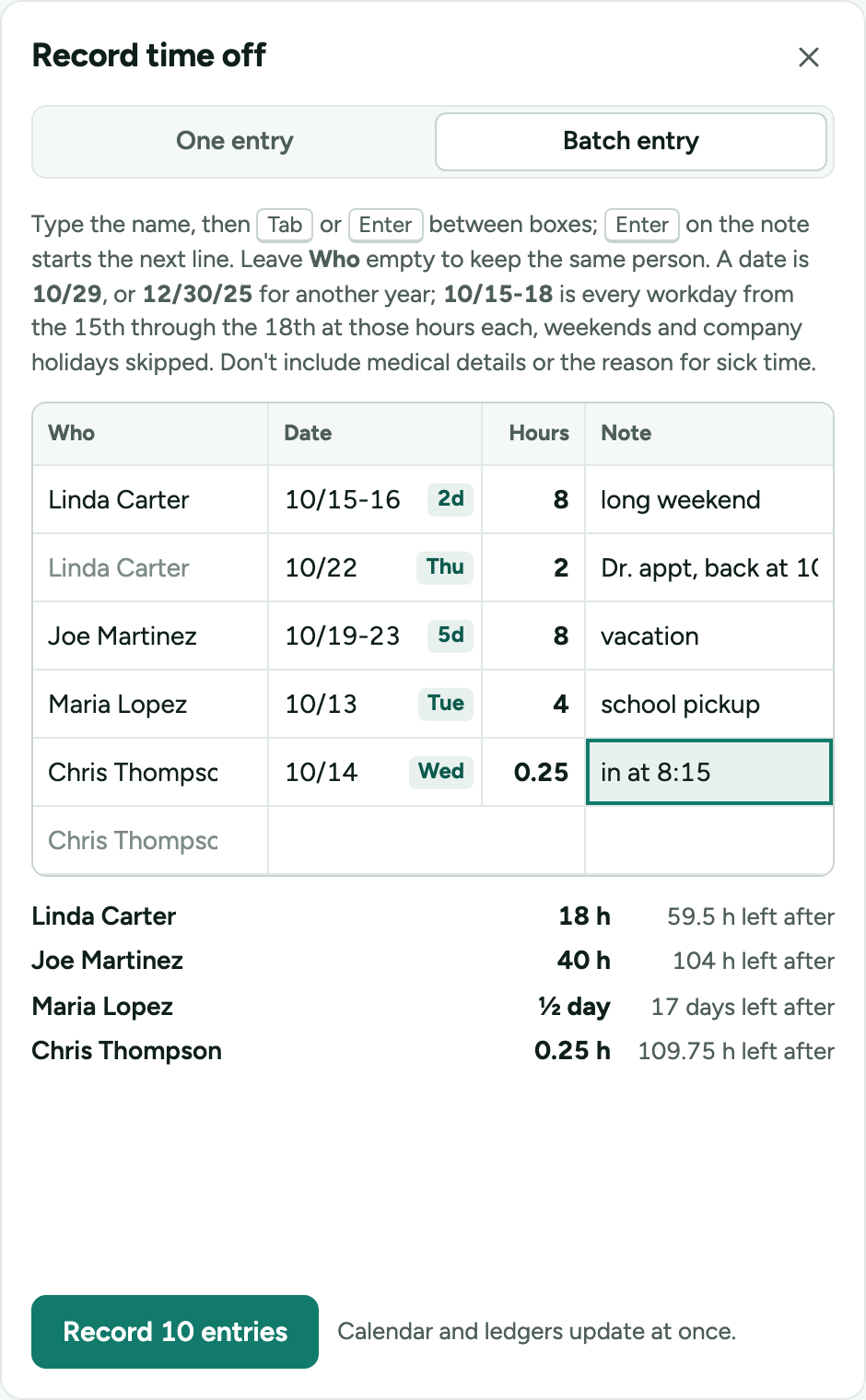
30 entries in a few minutesA batch grid: a name, a date or a range like 10/15-18, an amount, a note. Weekends and company holidays are skipped for you, and the running total per person shows what is left.
Part days that say whenLeaving at 1:45 or coming in at 10 shows on the calendar as the time, not a number of hours. A morning or an afternoon off says which half, and the first or last day of a run can be a half.
No login needed for the people you record forA whole crew can run with zero accounts. The supervisor enters it; they appear on the calendar and in exports like everyone else.
A ledger that never loses its historyEntries are never edited after the fact. A correction is a new entry or an adjustment with a reason, so the ledger always matches what payroll was told.
A full audit trailEvery action on your account is logged: who did it, when, and what changed, down to the grant PTO Fox worked out when someone passed an anniversary. Admins read it under Settings, filter it by person, and export it. Nothing in it can be edited or deleted.
See who's out, weeks ahead
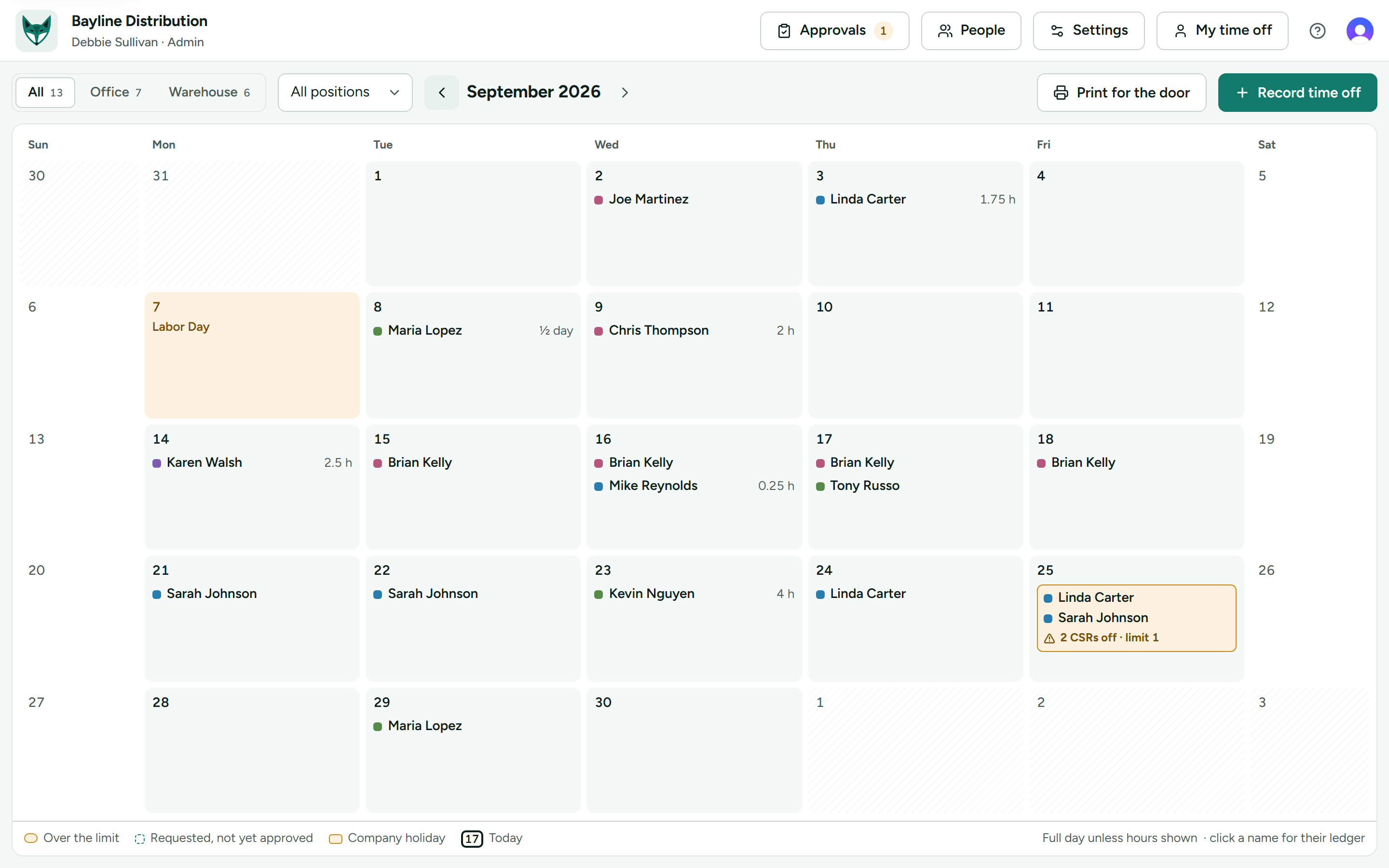
The paper calendar on the door, drawn from the ledger instead of maintained beside it.
Everyone, or one group at a timeA tab for each group and a filter by position. Everyone in the company can see who's out; only managers see the details.
Coverage limits per positionSay how many forklift operators or CSRs can be off at once. A clash is highlighted the day it is requested, not the day it happens.
Prints for the doorLandscape, names and dates, one month to a page: this month, three months or twelve at once. It can still go on the door.
Holidays on every calendarAdd the US federal holidays in one click, with the observed dates, or your own. They are skipped by requests and ranges and never deducted.
Balances computed, not typed
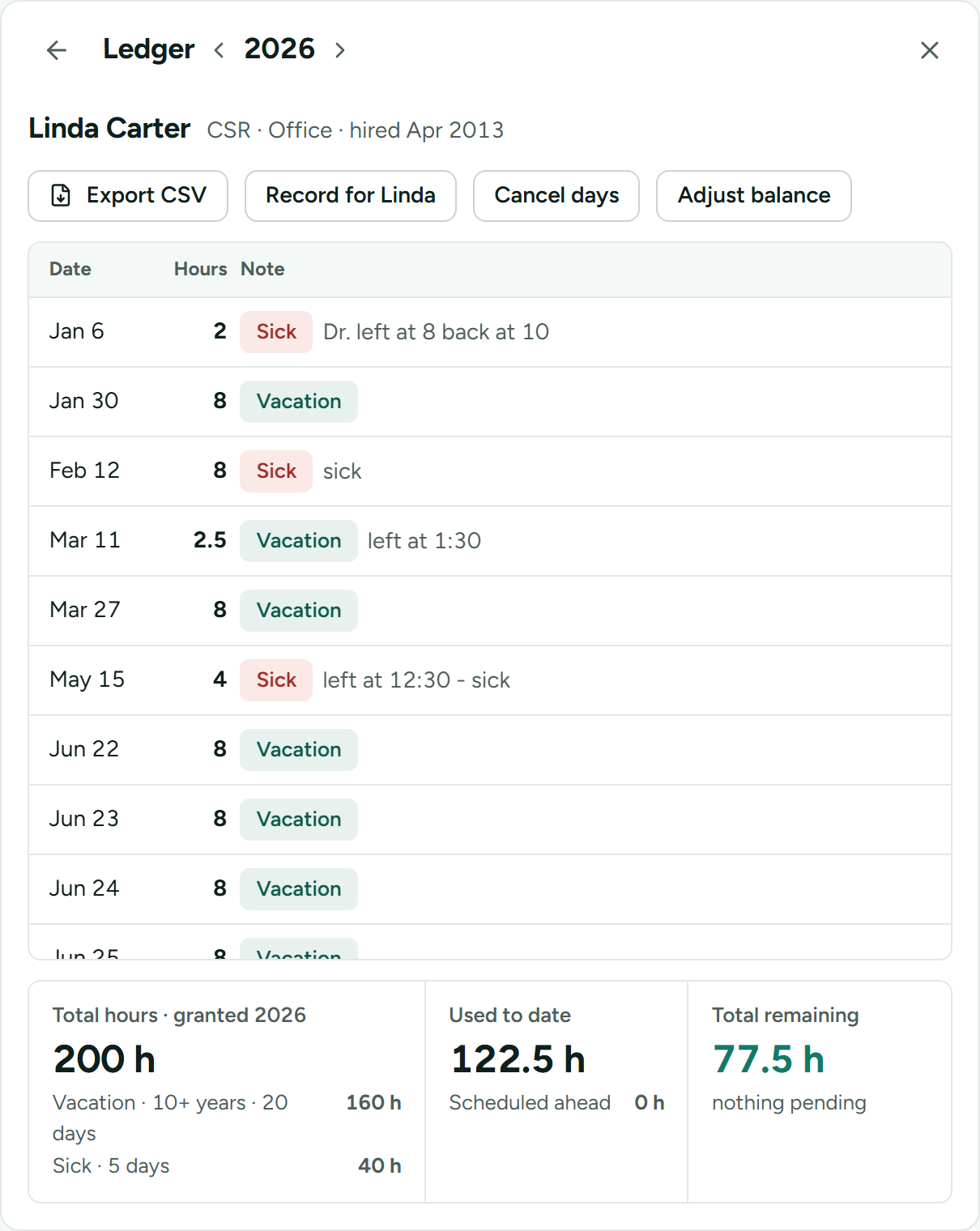
Each person's year comes from their hire date and your policy, with the pieces shown.
Your policy, in plain questionsProbation, how a first year is prorated, how much carries over, when years of service step up. Set once, applied to everyone.
One balance, or separate onesVacation by years of service, a fixed amount of sick time, anything else you grant. Spent as one balance, or kept apart so sick time is only sick time.
Exceptions when you need themAn amount typed for one person stands until you change it, and the ledger says it was set by an admin.
Two CSV files for payrollEvery piece of time off between two dates, with who recorded or approved it, and everyone's balances for the year. Open them in Excel or send them on.
Starting partway through the yearEnter what everyone has already used this year, all at once. The ledger matches your spreadsheet from day one.
Requests and one-click approval
For the people who want to ask for time off themselves, and the managers who answer.
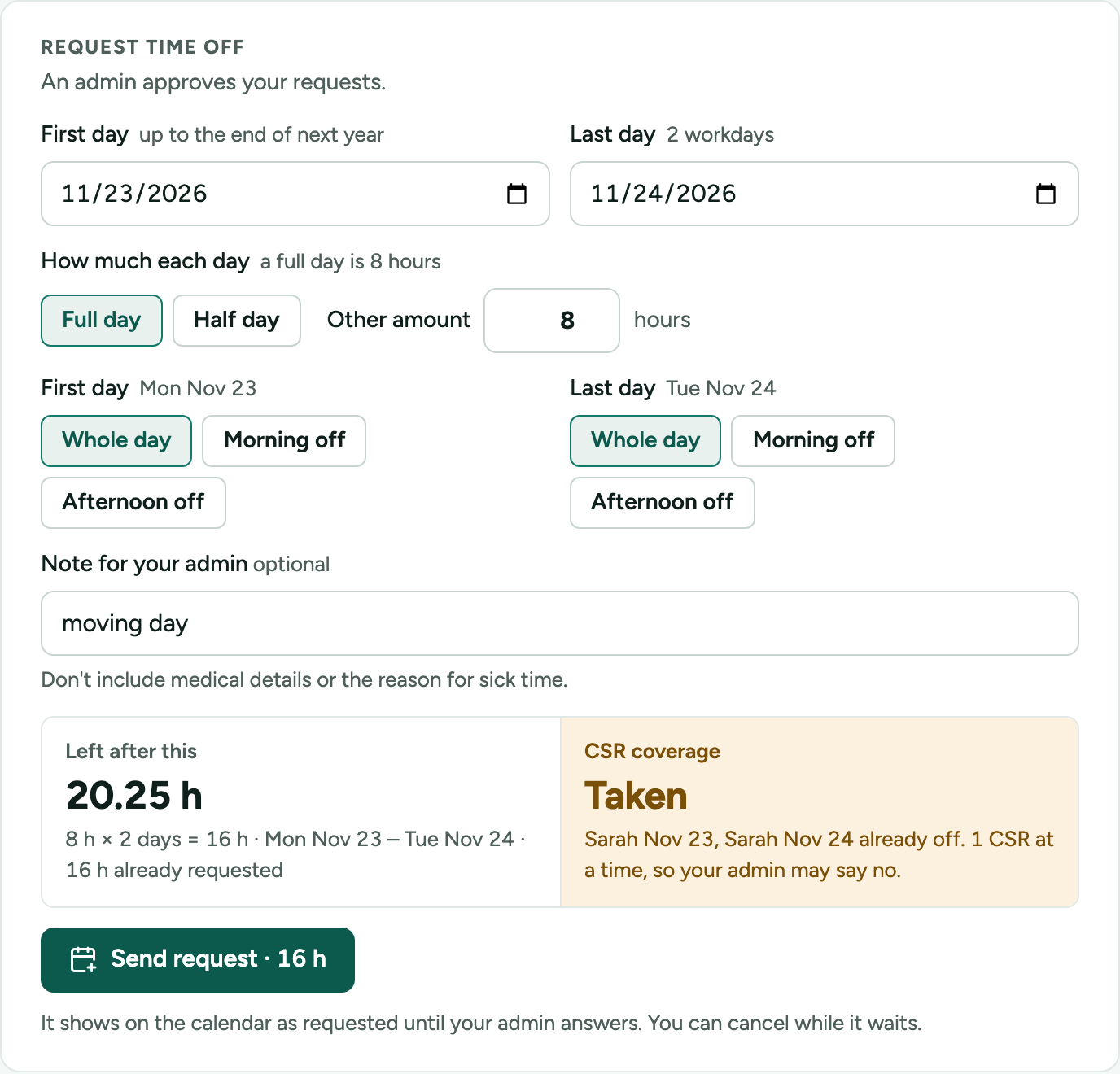
Request from any browserAn employee sees their balance, picks the days, and sees the balance after and any coverage clash before sending. No app to install, no company email, no password to remember.
Approve with the facts already on screenThe balance after and who else is off that day are on the card. Approving over a coverage limit is allowed, with a note.
Email when it mattersThe approver hears when a request is waiting. Employees with an email are notified when their request is decided. Nothing is sent for time off a manager records.
Cancel the days you don't needA pending request is withdrawn in one tap. Approved days still ahead are cancelled at once and the approver is told; a day already passed goes to the approver with a reason. Cancelled days stay in the ledger, struck through.
Managers who have managersEach person is assigned one approver. A manager acts for everyone who reports to them, directly or further down, and can name a substitute while away.
Quick to set up, from the spreadsheet you already keep
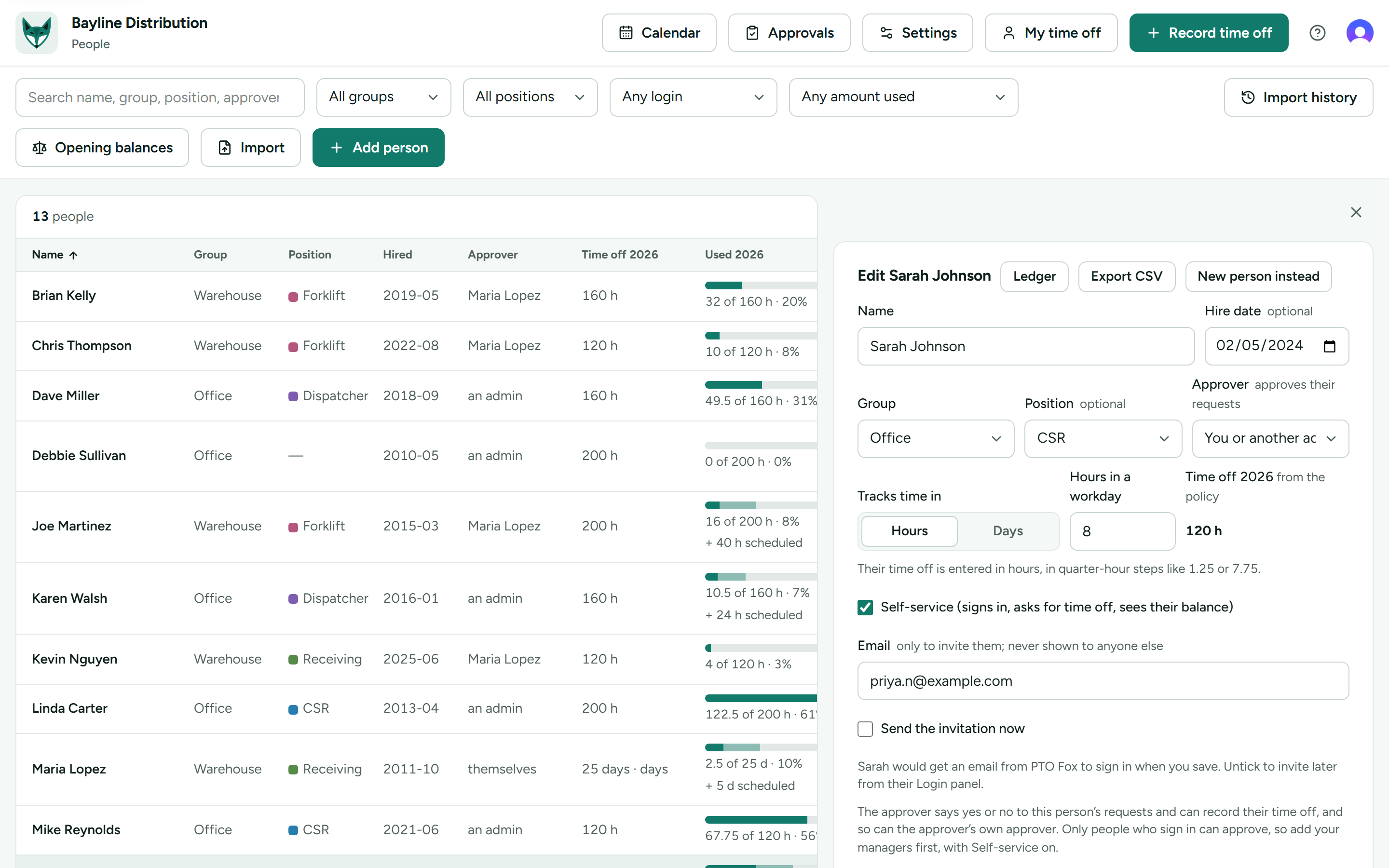
Guided setup asks what it needs, one step at a time, and your spreadsheet comes in by paste or CSV: the people first, then their history.
Paste your spreadsheetPaste from the sheet you keep, or choose a CSV file. Columns are guessed and reassignable; groups, positions and approvers named in the file are matched or made on the spot.
Several adminsMake anyone who signs in an admin, and take it back. There is always at least one.
When someone leavesDeactivate them: off every calendar and list, their login removed, their ledger kept for payroll and the exports.
Then your spreadsheet's historyPaste the sheet's dated rows, a name, a date, the hours or days, and each person's ledger shows the whole year, not just a balance. Names are matched, totals are shown before anything goes in.
Not a payroll system, HRIS, scheduler or time clock.Payroll stays the system of record. PTO Fox is the daily ledger between the calendar and payroll.